Monday, 18 February 2019

Sunday, 17 February 2019
Wednesday, 13 February 2019
MSCRM Interview Questions Links

- https://crmtipsbyprm.
wordpress.com/category/ interview-questions - https://community.dynamics.
com/crm/b/crmbusiness/archive/ 2015/11/09/microsoft-dynamics- crm-developer-interview- questions - http://mscrmforeveryone.
blogspot.com/2017/01/dynamics- 365-interview-questions.html - http://arpitmscrmhunt.
blogspot.com/p/interview- questions.html - https://codingcompiler.com/ms-
dynamics-crm-interview- questions/ - https://techblogpojha.wordpress.com/
- https://community.dynamics.com/crm/b/crmeventexecutionpipeline/archive/2016/03/15/microsoft-dynamics-event-execution-pipeline
- https://community.dynamics.com/crm/b/crmbusiness/archive/2015/02/05/understanding-plugin-sandbox-mode
What are Differences between MS Dynamics CRM Online and On-Premise versions?
Deployment Options
In general, there are two choices – CRM Online or CRM On-Premise. CRM Online is hosted in Microsoft’s cloud and is a completely turnkey solution. CRM On-Premise allows/requires you to deploy and setup the servers and applications yourself. There is a third option, Partner Hosted, which is essentially CRM On-Premise running on a Microsoft partners servers.
Infrastructure
Microsoft Dynamics CRM Online
Microsoft has physical and environmental security within the data centers, like Multi-Factor Authentication, Perimeter Security, Locked Racks and extensive video monitoring.
MS skilled staff provides local technical support to all the data centers.
MS Online has provided with a self-healing process through an automation workflow for quick resolution which needs no human intervention.
Microsoft Operation Centers provide 24/7 monitoring and system alerts to catch issues in which self-healing has not resolved and then escalated to a Service Engineer to resolve.
MS Dynamics CRM Online provides a sophisticated recovery process for data.
Microsoft Dynamics CRM Online also integrates with Office, Azure, Office 365, Oracle, Dynamics GP and many more…
Microsoft has physical and environmental security within the data centers, like Multi-Factor Authentication, Perimeter Security, Locked Racks and extensive video monitoring.
MS skilled staff provides local technical support to all the data centers.
MS Online has provided with a self-healing process through an automation workflow for quick resolution which needs no human intervention.
Microsoft Operation Centers provide 24/7 monitoring and system alerts to catch issues in which self-healing has not resolved and then escalated to a Service Engineer to resolve.
MS Dynamics CRM Online provides a sophisticated recovery process for data.
Microsoft Dynamics CRM Online also integrates with Office, Azure, Office 365, Oracle, Dynamics GP and many more…
Microsoft Dynamics CRM On-Premise security, backups, copies of data and certifications need to be implemented and monitored within individual company or by a hosted third party.
Data Integration Options
Integration options are similar between CRM online and On Premises. Integration performance vary based on the data load. Very large data integrations are typically faster with CRM On Premises if the integration server is close to the CRM server as latency is very low. CRM Online integration performance can be improved by optimizing the integration, using the bulk load API, or by reducing latency to the cloud by running the integration from a Microsoft Azure server.
Integration options are similar between CRM online and On Premises. Integration performance vary based on the data load. Very large data integrations are typically faster with CRM On Premises if the integration server is close to the CRM server as latency is very low. CRM Online integration performance can be improved by optimizing the integration, using the bulk load API, or by reducing latency to the cloud by running the integration from a Microsoft Azure server.
Integrations with other Microsoft platforms
Integration with other Microsoft platforms such as Sharepoint, Exchange, Lync, and Yammer work is possible with both CRM On Premises and CRM Online
If current system uses Office 365 for Exchange or SharePoint, CRM Online allows standardize user management and offers enhanced server side integration with SharePoint Online, Exchange Online, and PowerBI.
Integration with other Microsoft platforms such as Sharepoint, Exchange, Lync, and Yammer work is possible with both CRM On Premises and CRM Online
If current system uses Office 365 for Exchange or SharePoint, CRM Online allows standardize user management and offers enhanced server side integration with SharePoint Online, Exchange Online, and PowerBI.
Mobility
CRM clients for phone, tablet, and Outlook (including offline) work exactly the same between CRM Online and CRM On Premises.
Benefits of CRM Online
- CRM Online is a SaaS model. Choosing CRM Online means that your CRM system will be on Microsoft’s Cloud.
- Immediate access to new features of Dynamics CRM as soon as they are released.
- Access to features that are only available in CRM Online.
- MS demands you to update as per releases, to prevents you from falling multiple versions behind.
- Less expensive as you don’t need the IT infrastructure or maintenance.
- Online hosting, is a monthly fee payment instead of paying all at once.
- CRM Online is secure and reliable and has a super robust disaster recovery scenario that only few on-premises customers can afford to create.
Benefits of CRM On-premises
- This traditional model is where CRM is hosted by your company or by another hosting partner or vendor.
- You have access to the SQL database:
- You have the ability to run SQL queries and reports.
- If you run into performance issues, you can always throw mare hardware at it since you are responsible for the infrastructure.
- You can decide precisely when and if you want to upgrade.
- You can run old code that does not run in CRM online.
- You can decide and have control of security and setup.
| Capabilities | CRM Online | CRM On Premises |
| Exchange Synchronization | CRM for Outlook, Email Router, or Server Synchronization
(if using Exchange Online/Office 365)
| CRM for Outlook, Email Router, or Server Synchronization (if using Exchange on premise) |
| SharePoint Integration | Server Side with SharePoint Online (if using Office 365) | Client-side integration |
| Insights | Included | Additional cost |
| Social Listening | Included | Additional cost |
| Workflows/Dialogs | 200 | Unlimited |
| Custom Entities | 300 | Unlimited |
| SSRS Reports | FetchXML, or T-SQL from local reporting server | FetchXML or T-SQL |
| Power BI Reports | Yes | No |
| Upgrade/Update process | Before installation,Office 365 admin approves the upgrade.
Updates applied automatically
| Upgrades and update rollups installed by individual administrators |
| Direct server access | No | Yes |
| Phone App | Yes | Yes if environment externally facing via ADFS |
| Tablet App | Yes | Yes if environment externally facing via ADFS |
| Storage | Depends on the amount of CRM Online storage purchased | Depends on the amount of storage available on your server |
| Migration | CRM Online customers can migrate On Premises at any time. | CRM On Premises customers can migrate to CRM Online.
Data migration is required, as database cannot be moved to Online data center
|
| Environments | Provides non production environments that can be used for dev/test/UAT.
The number of organizations depends on the number of users.
|
Tuesday, 9 October 2018
MSCRM Plugin Vs Workflow
In Dynamics CRM, workflows and plugins are used to automate business processes.They allow businesses to hook onto events that occur in the system. Here we will look at the differences between the two and when to use which one.
Looking in Dynamics CRM in our default solution, we see Processes and Plug-in Assemblies.
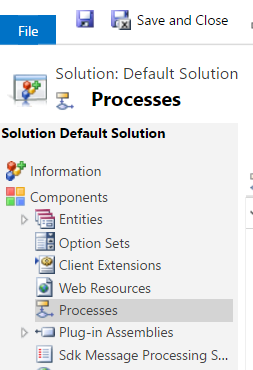
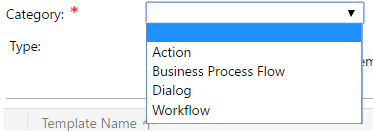
Processes are where our workflows are located, along with actions and business process flows.
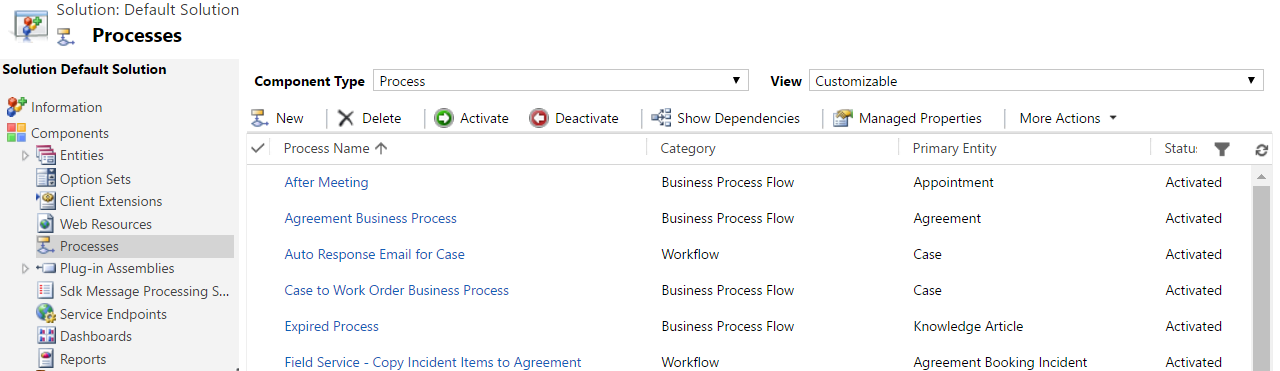
You can see there are several processes below:
Let’s take a look at one of these – Auto Response Email for Case:
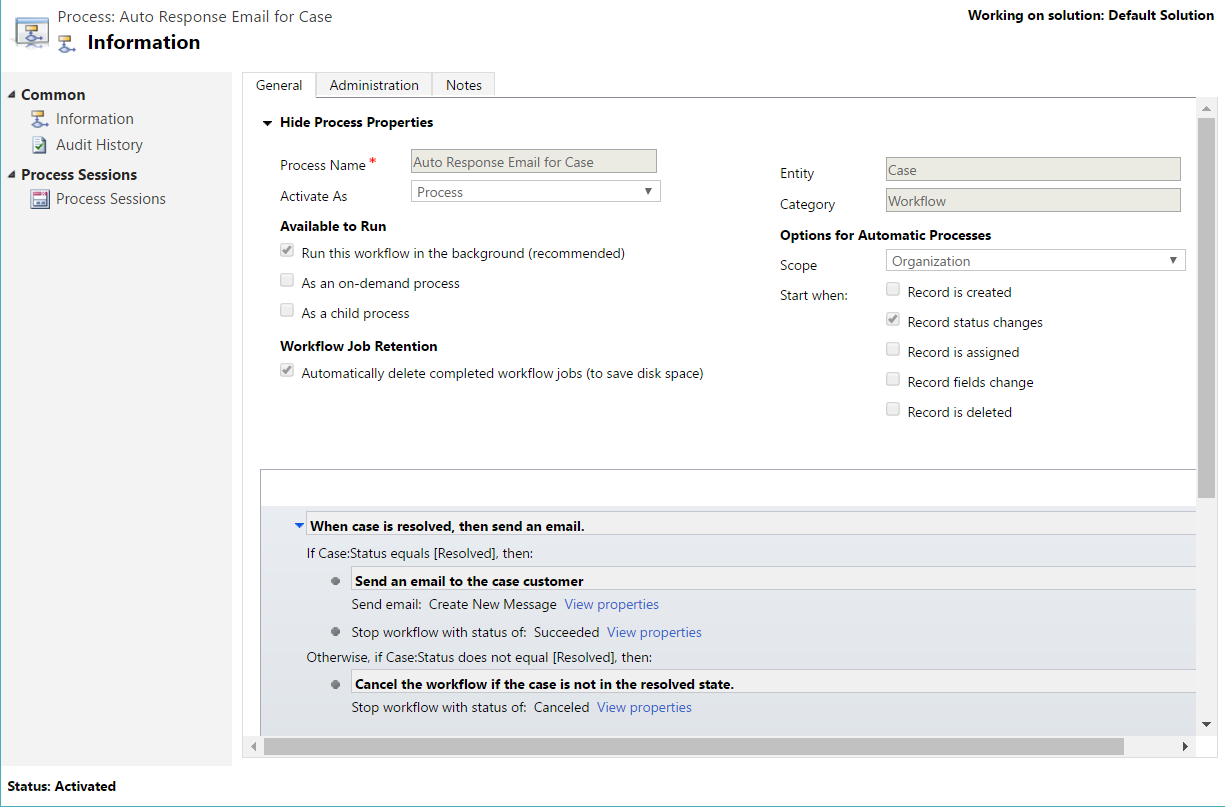
As can be seen, this workflow will run on the Case entity when a record status is changed, and it will run in the background. The logic says:
- If the case status is resolved, send a new email message and stop the workflow
- Otherwise, stop the workflow
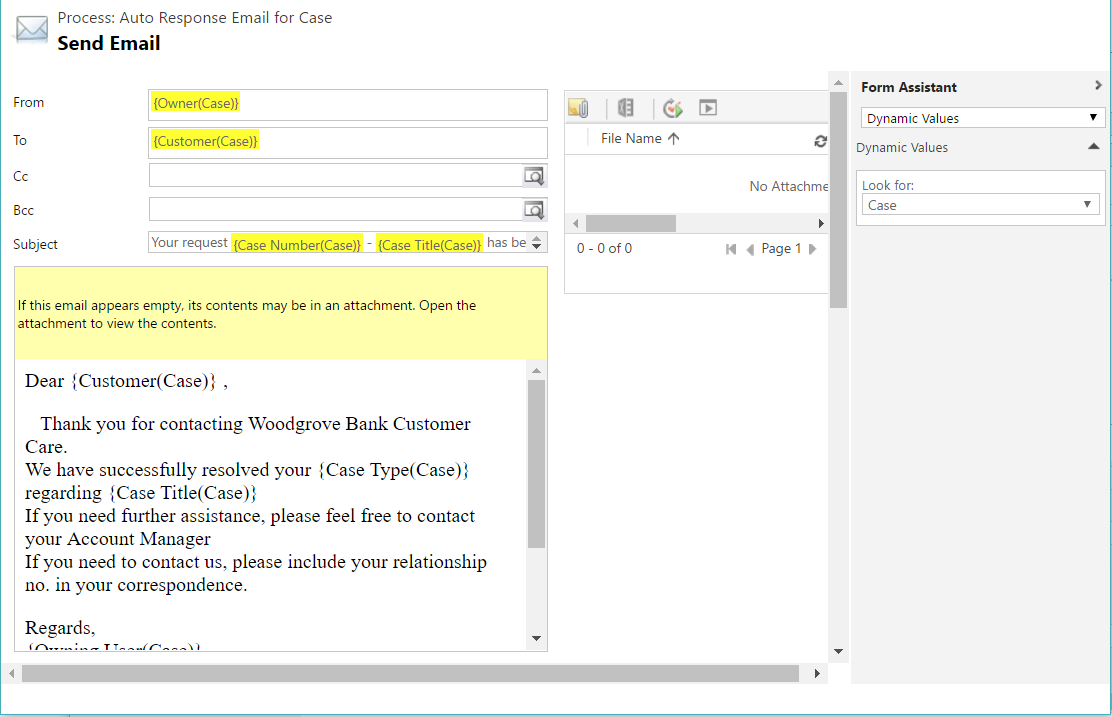
Opening the first step, we can see we have an email template, where we can add the from and to as dynamic values from the case itself. The message of the email allows for text and dynamic values as well.
Note the workflow was activated. If we disable the workflow by pressing Disable, we will be able to edit the workflow. We can add more steps to the workflow.
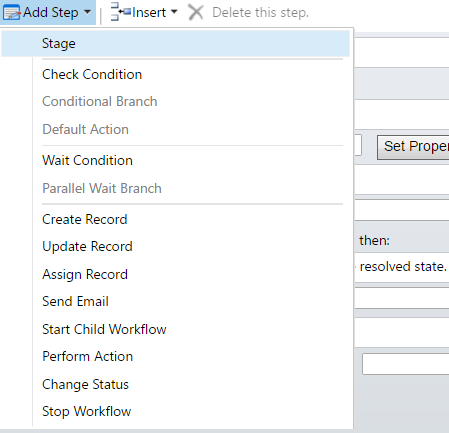
For example, if we wanted to update another record as a result of the case being resolved, we could add a “Update Record” step. We could also run a child workflow or perform an action.
You can see workflows are useful for tasks such as updating data, and can be triggered when you save/delete/update records and fields.
The workflow is set to run in the background:
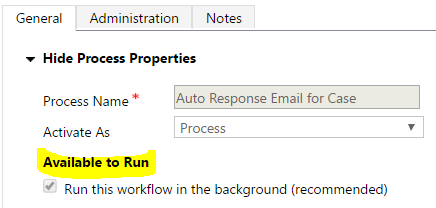
What this means, is the workflow will run asynchronously. If this box was unchecked, the workflow would run synchronously and the system would wait for its completion. You can also convert to a real-time workflow by clicking a button:

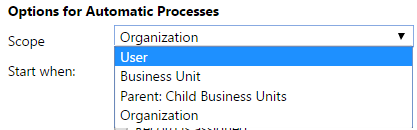
The scope of the entity defines who can run the workflow. If you want your workflow to run on any record in the organization you would set it to Organization.
Workflows are also triggered off certain events:
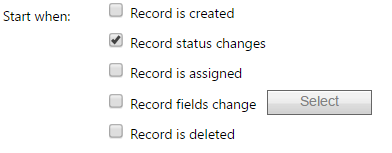
Workflows do not run offline. I.e. if you are using the CRM Outlook Client in offline mode, workflows won’t run until you come back online as they need to access the CRM server.
A key thing to note is that the workflows described above do note require development. A business user can go in and set up a workflow.
Now let’s discuss Plugins.
Plugins are different from workflows in CRM. Here you can see we have some plugins registered in the system:
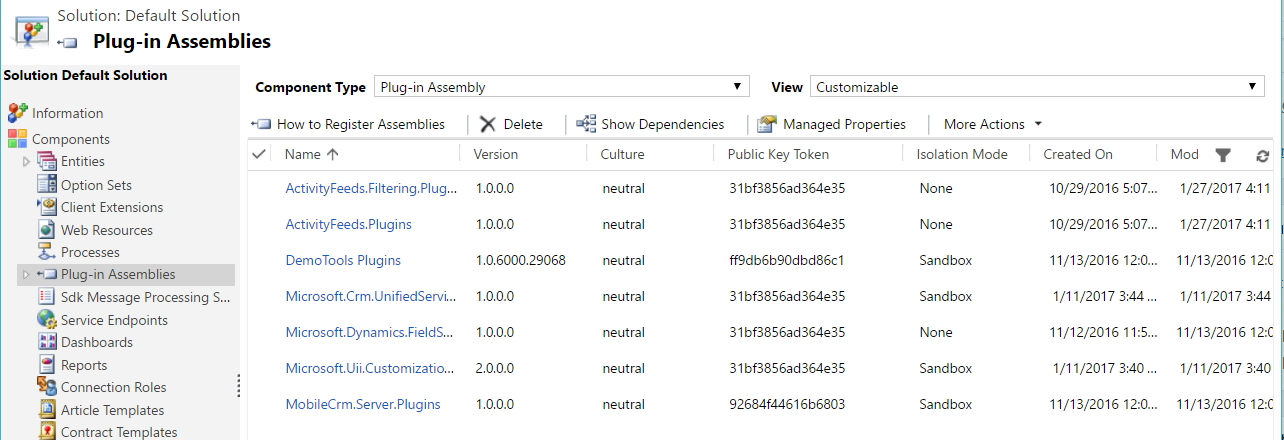
Plugins are .NET code that is written by developers. As such, there is a lot you can do with a plugin, such as integrating with different systems. Plugins can run synchronously or asynchronously.
Plugins are written in Visual Studio and then deployed using the Plugin Registration Tool. This is located in the CRM SDK in the SDK\Tools\PluginRegistration folder.
You register the assembly created in Visual Studio and then register a step that defines what happens. Here you define which assembly the plugin should fire on (primary and secondary entities) and on what event (the message). Events include Assign, Create, Delete, Retrieve, Retrieve Multiple, Update, GrantAccess, RetrievePrincipalAccess, SetState and more. You can see there are more events available that workflows.
Check out this link from Microsoft for more information: https://msdn.microsoft.com/en-us/library/gg328576.aspx
One of these events will need to run in order for the plugin to fire, i.e. there is no “on demand” running like there is with workflows.
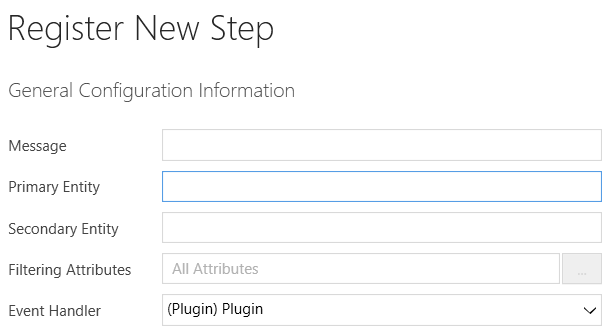
When registering the plugin, you have several options:
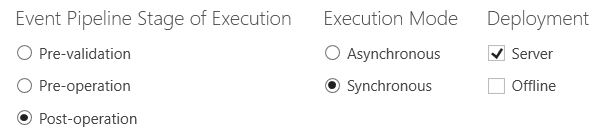
You can see here, you can define when the plugin should run. The options are:
- Pre-validation. Runs before anything else
- Pre-operation. Runs after validation and before committing to the database
- Post-event. Runs after record committed to the database
A main advantage with plugins is that they work in an offline environment, which is different from workflows which cannot.
Both plugins and workflows work in an on-premise and online environment.
In summary, when to use a workflow or a plugin depends on requirements.
Monday, 8 October 2018
MSCRM Plugin Development Steps
This section will cover the following:
- How to start developing a plug-in
- Example 1: Update parent record based on multiple fields
- Example 2: Update same record based on multiple fields
How to Start Developing a Plug-in
1. Download CRM SDK. This will provide you all the information, required SDK assemblies, and many helpful samples.
2. Set up your plug-in project in Visual Studio. This will be a .NET class library.

3. Add References. At a minimum, you will need Microsoft.Xrm.Sdk, obtained from CRM SDK.
4. Extend the class from Microsoft.Xrm.Sdk.IPlugin
5. Write your code

6. At the project, sign the assembly. This is required in order to be able to deploy the plugin.

7. Compile the assembly and deploy using Plugin Registration Tool.
Example 1: Update parent record based on multiple fields
Here’s an extremely simplified example of a plug-in. We have parent record with a field for total and a single child with unit and rate. When either unit or rate changes, we want to multiply these and update to the total of the parent.
Design Notes
- Because a user may only update units and not update rate, we cannot use a target which would only include the attributes that were actually updated. Therefore, we use an image to make sure we get the necessary attributes, without having to do additional data retrieve.
- The plug-in is post-update, so we will have access to post-image, showing all values like they are after an update.
- When registering the plugin, we set filtering attributes to include only rate and units. Therefore, the plugin will not trigger needlessly if something unrelated updates.
- When setting up the Image, we only need rate, units, and parent ID.
Plug-in Code
Example 2: Update same record based on multiple fields
This example is similar to the one above, but let’s assume our total is on same entity.
- In order to change the total on the fly, the plug-in needs to be pre-update
- This means we do not have access to post the image and have to use the pre-image instead. Therefore, we need to get all the changed values from the target, and unchanged values from the image.
Plug-in Code
A plug-in is a custom business logic that integrates with Microsoft Dynamics CRM to modify or extend the standard behavior of the platform. Plug-ins act as event handlers and are registered to execute on a particular event in CRM. Plugins are written in either C# or VB and can run either in synchronous or asynchronous mode.
Some scenarios where you would write a plugin are −
- You want to execute some business logic such as updating certain fields of a record or updating related records, etc. when you create or update a CRM record.
- You want to call an external web service on certain events such as saving or updating a record.
- You want to dynamically calculate the field values when any record is opened.
- You want to automate processes such as sending e-mails to your customers on certain events in CRM.
Event Framework
The Event Processing Framework in CRM processes the synchronous and asynchronous plugin requests by passing it to the event execution pipeline. Whenever an event triggers a plugin logic, a message is sent to the CRM Organization Web Service where it can be read or modified by other plugins or any core operations of the platform.
Plugin Pipeline Stages
The entire plugin pipeline is divided in multiple stages on which you can register your custom business logic. The pipeline stage specified indicates at which stage of the plugin execution cycle, your plugin code runs. Out of all the specified pipeline stages in the following table, you can register your custom plugins only on Pre- and Post-events. You can’t register plugins on Platform Core Main Operations.
| Event | Stage Name | Description |
|---|---|---|
| Pre-Event | Pre-validation | Stage in the pipeline for plug-ins that are to execute before the main system operation. Plug-ins registered in this stage may execute outside the database transaction. |
| Pre-Event | Pre-operation | Stage in the pipeline for plug-ins that are to executed before the main system operation. Plugins registered in this stage are executed within the database transaction. |
| Platform Core Operation | MainOperation | Intransaction,the main operation of the system, such as create, update, delete, and so on. No custom plug-ins can be registered in this stage. For internal use only. |
| Post-Event | Post-operation | Stage in the pipeline for plug-ins which are to executed after the main operation. Plug-ins registered in this stage are executed within the database transaction. |
Whenever the CRM application invokes an event (like saving or updating a record), the following sequence of actions takes place −
- The event triggers a Web service call and the execution is passed through the event pipeline stages (pre-event, platform core operations, post-event).
- The information is internally packaged as an OrganizationRequest message and finally sent to the internal CRM Web service methods and platform core operations.
- The OrganizationRequest message is first received by pre-event plugins, which can modify the information before passing it to platform core operations. After the platform core operations, the message is packaged as OrganizationResponse and passed to the post-operation plugins. The postoperations plugins can optionally modify this information before passing it to the async plugin.
- The plugins receive this information in the form of context object that is passed to the Execute method after which the further processing happens.
- After all the plugin processing completes, the execution is passed back to the application which triggered the event.
Plugin Messages
Messages are the events on which the plugin (or business logic) is registered. For example, you can register a plugin on Create Message of Contact entity. This would fire the business logic whenever a new Contact record is created.
For custom entities, following are the supported messages based on whether the entity is user-owned or organization-owned.
| Message Name | Ownership Type |
|---|---|
| Assign | User-owned entities only |
| Create | User-owned and organization-owned entities |
| Delete | User-owned and organization-owned entities |
| GrantAccess | User-owned entities only |
| ModifyAccess | User-owned entities only |
| Retrieve | User-owned and organization-owned entities |
| RetrieveMultiple | User-owned and organization-owned entities |
| RetrievePrincipalAccess | User-owned entities only |
| RetrieveSharedPrincipalsAndAccess | User-owned entities only |
| RevokeAccess | User-owned entities only |
| SetState | User-owned and organization-owned entities |
| SetStateDynamicEntity | User-owned and organization-owned entities |
| Update | User-owned and organization-owned entities |
For default out-of-the-box entities, there are more than 100 supported messages. Some of these messages are applicable for all the entities while some of them are specific to certain entities. You can find the complete list of supported message in an excel file inside the SDK: SDK\Message-entity support for plug-ins.xlsx
Writing Plugin
In this section, we will learn the basics of writing a plugin. We will be creating a sample plugin that creates a Task activity to follow-up with the customer whenever a new customer is added to the system, i.e. whenever a new Contactrecord is created in CRM.
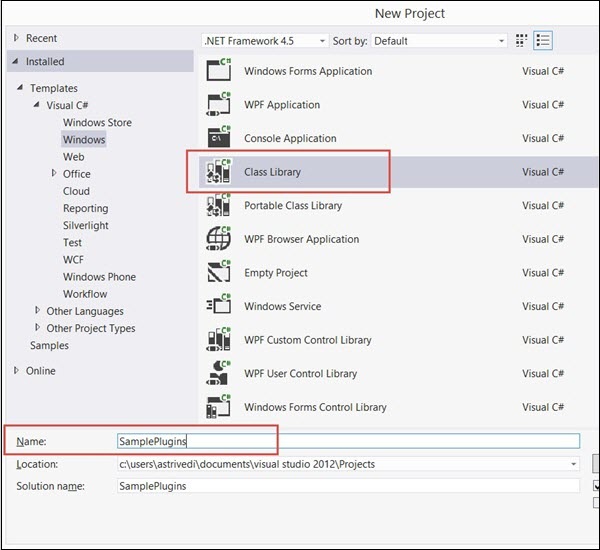
First of all, you would need to include the references to Microsoft.Xrm.Sdknamespace. The CRM SDK contains all the required SDK assemblies. Assuming that you have already downloaded and installed the SDK in Chapter 2, open Visual Studio. Create a new project of type Class Library. You can name the project as SamplePlugins and click OK.
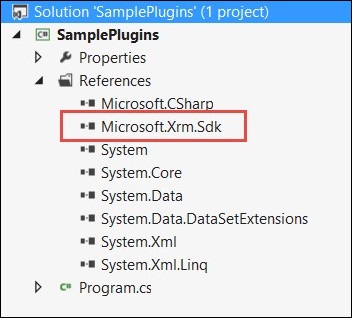
Add the reference of Microsoft.Xrm.Sdk assembly to your project. The assembly is present in SDK/Bin.
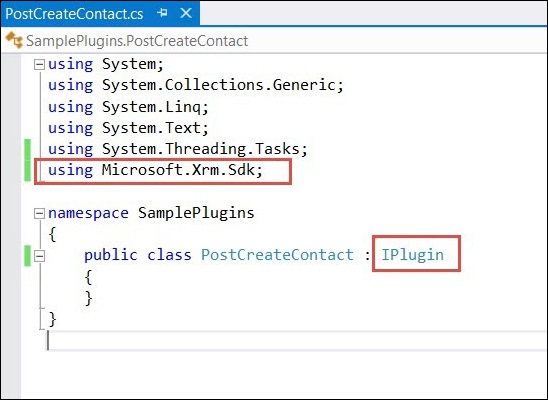
Now, create a class named PostCreateContact.cs and extend the class from IPlugin. Till now, your code will look something like the following.
You will also need to add reference to System.Runtime.Serialization. Once you have added the required references, copy the following code inside the PostCreateContact class.
using System;
using System.Collections.Generic;
using System.Linq;
using System.Text;
using System.Threading.Tasks;
using Microsoft.Xrm.Sdk;
namespace SamplePlugins {
public class PostCreateContact:IPlugin {
/// A plug-in that creates a follow-up task activity when a new account is created.
/// Register this plug-in on the Create message, account entity,
/// and asynchronous mode.
public void Execute(IServiceProviderserviceProvider) {
// Obtain the execution context from the service provider.
IPluginExecutionContext context =(IPluginExecutionContext)
serviceProvider.GetService(typeof(IPluginExecutionContext));
// The InputParameters collection contains all the data
passed in the message request.
if(context.InputParameters.Contains("Target")&&
context.InputParameters["Target"]isEntity) {
// Obtain the target entity from the input parameters.
Entity entity = (Entity)context.InputParameters["Target"];
try {
// Create a task activity to follow up with the account customer in 7 days
Entity followup = new Entity("task");
followup["subject"] = "Send e-mail to the new customer.";
followup["description"] =
"Follow up with the customer. Check if there are any new issues
that need resolution.";
followup["scheduledstart"] = DateTime.Now;
followup["scheduledend"] = DateTime.Now.AddDays(2);
followup["category"] = context.PrimaryEntityName;
// Refer to the contact in the task activity.
if(context.OutputParameters.Contains("id")) {
Guid regardingobjectid = new Guid(context.OutputParameter
s["id"].ToString());
string regardingobjectidType = "contact";
followup["regardingobjectid"] =
new EntityReference(rega rdingobjectidType,regardingobjectid);
}
// Obtain the organization service reference.
IOrganizationServiceFactory serviceFactory =
(IOrganizationSer viceFactory)serviceProvider.GetService
(typeof(IOrganizationServiceFactory));
IOrganizationService service =
serviceFactory.CreateOrganizationService(context.UserId);
// Create the followup activity
service.Create(followup);
} catch(Exception ex) {
throw new InvalidPluginExecutionException(ex.Message);
}
}
}
}
}
Following is a step-by-step explanation of what this code does −
Step 1 − Implements the Execute method by taking IServiceProvider object as its parameter. The service provider contains references to many useful objects that you are going to use within plugin.
Step 2 − Obtains the IPluginExecutionContext object using the GetService method of IServiceProvider.
Step 3 − Gets the target entity’s object from the context object’s InputParameters collection. This Entity class object refers to the Contact entity record on which our plugin would be registered.
Step 4 − It then creates an object of Task entity and sets proper subject, description, dates, category and regardingobjectid. The regardingobjectid indicates for which contact record this activity record is being created. You can see that the code gets the id of the parent Contact record using context.OutputParameters and associates it with the Task entity record which you have created.
Step 5 − Creates object of IOrganizationServiceFactory using the IServiceProvider object.
Step 6 − Creates object of IOrganizationService using the IOrganizationServiceFactory object.
Step 7 − Finally, using the Create method of this service object. It creates the follow-up activity which gets saved in CRM.
Signing the Plugin Assembly
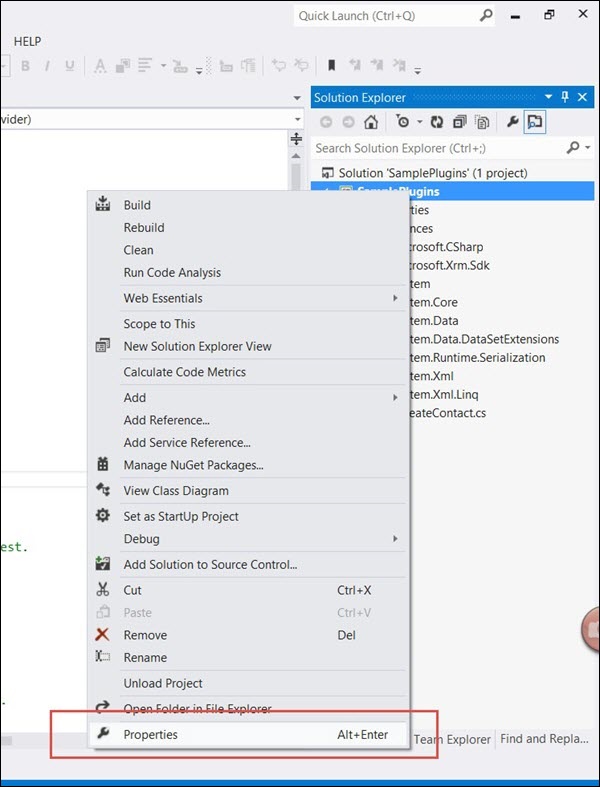
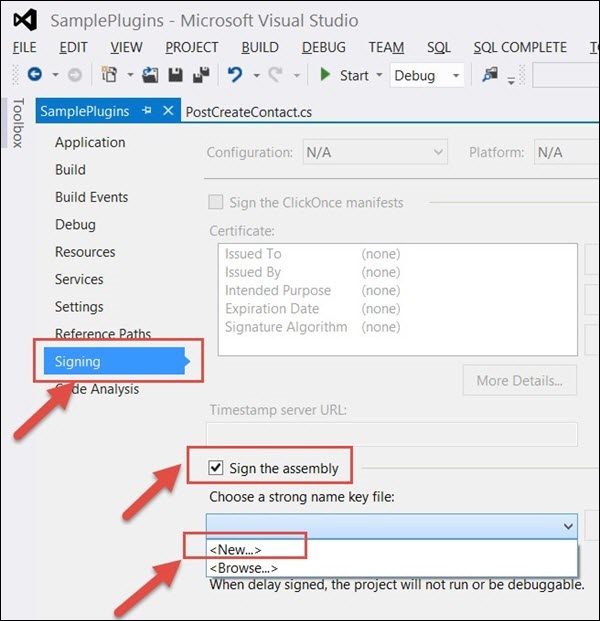
This section is applicable only if you are registering your plugin assembly for the first time. You need to sign in the assembly with a key to be able to deploy the plugin. Rightclick the solution and click Properties.
Select the Signing tab from the left options and check the ‘Sign the assembly’ option. Then, select New from Choose a strong name key file option.
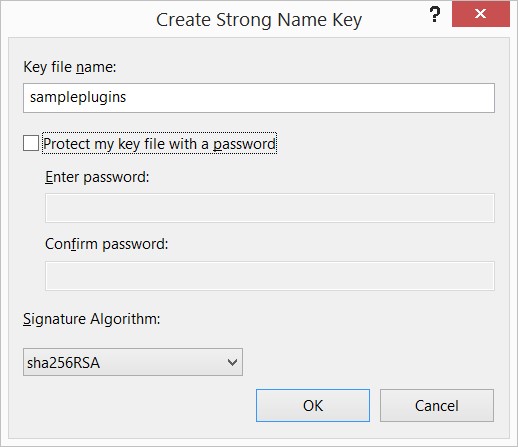
Enter the Key file name as sampleplugins (This can be any other name you want). Uncheck the Protect my key file with a password option and click OK. Click Save.
Finally, build the solution. Right Click → Build. Building the solution will generate assembly DLL, which we will use in the next chapter to register this plugin.
Exception Handling in Plugin
More often than not, your plugin logic will need to handle run-time exceptions. For synchronous plugins, you can return an InvalidPluginExecutionException exception, which will show an error dialog box to the user. The error dialog will contain the custom error message that you pass to the Message object of the exception object.
If you look at our code, we are throwing the InvalidPluginExecutionException exception in our catch block.
throw new InvalidPluginExecutionException(ex.Message);
Conclusion
Plugins are definitely crucial to any custom CRM implementation. In this chapter, we focused on understanding the event framework model, pipeline stages, messages, and writing a sample plugin. In the next chapter, we will register this plugin in CRM and see it working from end-to-end scenario.
Subscribe to:
Posts (Atom)
-
by mydevexperience (abm) In this blog I will explain how to retrieve all files from a specified SharePoint folder and send email as an at...
-
How to disable auto-save for a form If you wish to disable auto-save for specific entity forms, you can do this by adding code to the On...
-
Ref: https://dynamics365blocks.wordpress.com/2016/12/06/how-to-debug-a-plugin-in-dynamics-365-online-using-plugin-profiler/ How to debu...


